Showing posts with label device. Show all posts

Monday, November 28, 2011

Get extreme....with your text messaging!

Take texting to a new level with Extreme Text Messaging - exclusively from Rogers as a standard part of Rogers Wireless Service.

But what does Extreme Text Messaging do for you?

  • Auto-Reply - Send an auto-reply to those who text you
  • Forward - Just like call forwarding, except for text messaging
  • Blocker - Block incoming texts from unwanted sources
  • Distribution Lists - Send the same text to a group of contacts
  • Copy - Copy incoming texts to another number or email
  • Personal Signature - Sign outgoing texts with your name, title or a favourite quote
Already a Rogers customer? Use the FREE My Account app on your wireless device to manage your Extreme Text Messaging features.

For more information, visit www.rogers.com/extremetext, or visit your BC and Ontario Cellworks locations to speak with a store representative today.

Monday, October 17, 2011

What is iCloud?

iCloud is Apple’s new cloud service, which stores your music, photos, apps, calendars, documents, and more, and wirelessly pushes them to all devices. iCloud is integrated with your apps, so everything happens automatically. You get instant access to your music, apps, and latest photos, and iCloud keeps email, contacts, and calendars up to date across all of your devices.

iCloud is free with iOS 5 and OS X Lion. It comes with unlimited free storage for purchased music, TV shows, books, and apps. You also get 5GB of free storage for email, documents, and backup. If you need more, you can easily purchase a storage upgrade right from their device.

iTunes in the Cloud
With iTunes in the Cloud, any new music you buy is downloaded to all your iOS devices over Wi-Fi or 3G. You can even go back to songs, albums, or TV shows were purchased in the iTunes Store and download them again at no additional cost to your iPhone, iPad, iPod touch, Mac, or PC.

And if you have music you’ve ripped from CDs or purchased somewhere other than iTunes, you can get the same benefits of iTunes in the Cloud with iTunes Match. 

Photo Stream
If you have taken a photo on your iPhone and want to view it later on another device—only to realize you haven’t synced your photos—you will appreciate Photo Stream. When you take a photo on one device, it’s automatically sent to iCloud and pushed to your other devices. So you don’t have to sync photos to view them on another device or computer—the photos are just there.

Documents in the Cloud
If you are working on a document on your iPad and have the same app on another device, Cloud can keep your documents up to date across all devices. And all of this happens automatically, without any effort from you.

Apps and books
When you find an app you like on your iPhone, you may want to have the same app on your iPad. And if you purchase a book on your iPad, you may want it on your iPhone. iCloud makes sure all your iOS devices have the same apps and books.

Contacts, Calendar, and Mail
iCloud stores your contacts, calendars, and email and automatically pushes them to all devices. So you can switch from one device to another and still get email, stay in touch, and keep your calendar up to date.

Find My Friends
The Find My Friends app is a great way for you to share your location with people who are important to you. With Find My Friends, you can share your locations for a limited time and easily locate your friends and family from your iPhone, iPad or, iPod touch. Find My Friends is a free app available on the App Store. *

Find My iPhone
The Find My iPhone app can help you find a missing iPhone, iPad, iPod touch, and Mac. Just by opening the app and signing in with an Apple ID, you can see your device’s location on a map and have it display a message or play a sound, remotely lock the device, or wipe it to permanently delete all of your data.

Backup
Your carry important information on your iOS devices. If something happens to your device, Backup can help you get your information back. iCloud automatically backs up your iOS devices daily over Wi-Fi. And if you buy a new iOS device or need to restore information to one you already have, iCloud does all the work.

What does iCloud back up?
  • Purchased music, apps, and books
  • Photos and video in the Camera Roll
  • Device settings
  • App data
  • Home screen and app organization
  • Messages (iMessage, SMS, and MMS)
  • Ringtones
Getting an iCloud account - http://www.apple.com/icloud/

Transitioning MobileMe Customers
Customers with MobileMe may be wondering what iCloud means for their MobileMe account. 
  • http://www.apple.com/mobileme/transition.html
  • If you had a MobileMe account as of June 6, 2011, service has been extended through June 30, 2012
  • MobileMe members can move their me.com and mac.com email address, and their email messages, contacts, calendars, and bookmarks to iCloud.
  • After moving, customers can continue to use iWeb publishing, Gallery, and iDisk, through June 30, 2012. After that date, these services will no longer be available.
You will receive an email from Apple about how to move to iCloud.

Thursday, June 30, 2011

The LTE revolution is coming - are you ready?

Rogers is on the verge of introducing its new LTE, or Long Term Evolution, network and when it does, wireless customers are going to witness the new gold standard in wireless transmissions.

With the ability to experience speeds up to four times faster than current network capabilities, customers will be able to enjoy service comparable to their home or office computers. Four cities will be the first to enjoy this new network deployment in 2011 - Montreal, Ottawa, Toronto and Vancouver - with a further 21 cities to join them in 2012.

What can we expect from this revolution?
  • Stream movies instantly on a tablet with virtually no delays or buffering
  • Experience a revolution in wireless multiplayer real-time online gaming
  • Conduct wireless group video conferences in real-time, with virtually no lag time
  • Access data-intensive business applications while on the go
Users will need to invest in new hardware, SIM cards and services to fully enjoy the new network options, but with the ability to upgrade earlier than normal now, this shouldn't be an issue for those that have been patiently holding on to their old hardware. The first announced device designed for the LTE network is the LTE Rocket Stick from Sierra Wireless, and Ottawa residents are already able to pre-order the device so they are ready for their new network.

This is the future of wireless communication - how will it affect your summer?

Tuesday, June 28, 2011

Why a tablet?

Whether you are a business owner, or employee, staying connected and efficient are two of the most important things to you. 

Q2 has seen an influx of tablet devices designed to help with those two factors, yet many people wonder if a tablet is right for them. Here is some food for thought:


  • Respond to emails, browse the Internet, and use your applications from a widescreen device that fits easily in a pocket or purse
  • Conduct customer presentations using quality images on a high-definition screen; a lightweight alternative to laptops and projectors
  • Provide one-on-one support to your sales teams with real time demonstrations and product information right from the device
  • Replace paper products and be more environmentally friendly as a result, with a device that is both versatile and reusable
  • Benefit from the same security you are used to with your SmartPhone, essentially creating an extension of the device you always carry with you
  • And still have time to relax when you are away from the office by enjoying music, pictures and videos with the built-in media and storage
In addition to all the awesome qualities of a tablet device, you can easily add one to your existing account with a Data Share Plan starting at just $10 / device / month. No need to worry about data that you haven't used - your tablet can make full use of your existing data plan.

Thursday, March 3, 2011

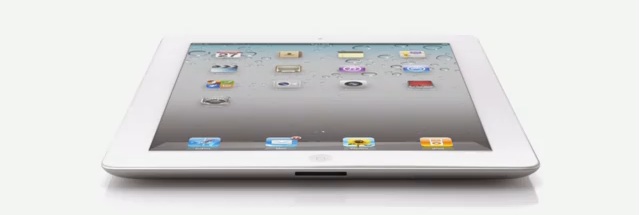
Canada Gets the iPad2 on March 25


We all knew it was inevitable, with the launch of various tablet devices over the past six months, there was no way that Apple was going to be left behind (despite being the innovator for the product).


Yesterday, Apple announced that the iPad2 will be coming to Canada on March 25, and promises to be yet another marvel from the electronics giant. Some of the new features include:


  • Two cameras (front and rear-facing) for FaceTime users
  • HD video recording
  • Dual core chip
  • 9.7inch high-resolution screen
  • Pre-loaded with iOS4
  • Updates to existing features, such as the accelerometer, gyro-scope and compass, now work smoothly together
  • Video-mirroring allows the iPad 2 to plug into your projector or HDTV for full-screen cinematic viewing and sharing
  • 33% thinner and almost 15% lighter than the original iPad
  • Maintains the same 10-hour battery life
And in order to keep your iPad2 looking brand new, Apple has also introduced the iPad Smart Cover, available in a range of colours to completely personalize the newest addition to your Apple collection.

As soon as this is available in Canada, Rogers will ensure that the existing iPad plans are available for users wishing to move to the new device. And the new Data Share Plans are expanding to include iPad2 as well.

Friday, December 3, 2010

iPad Alternatives Are Becoming More Popular

With the launch of the Samsung Galaxy Tab, there is the expectation that more corporate users are going to demand it for their mobile internet needs. With the move away from paper and bulky laptops, tablets such as the Galaxy are likely to be popular with hospitals, doctors, and other business folk that have, until now, had to deal with endless paperwork.


The wait for the BlackBerry Playbook has also created an interest in these kinds of users, and functions such as HD capabilities, front and rear facing cameras, and the ability to tether with a BlackBerry device, such as the Torch, are tempting customers away from the ever-popular Apple iPad.


The Samsung Galaxy Tab is the first tablet device to allow full Flash performance, and with it's super high resolution AMOLED screen, the user experience is extremely impressive.


Until now, the Apple iPad has commanded tablet sales  with a 95% share of the market, but other manufacturers are jumping on the tablet bandwagon, with products set to emerge from Hewlett Packard, Motorola, Lenovo and Acer in the near future.


Companies that have so far focused their sales on standard PC's and laptops are looking to reduce their sales forecasts for these types of products in anticipation of cannibalization by the tablet market. Although the growth forecasts aren't changing dramatically, it is still evidence that customer preferences are moving to items that make their daily lives more efficient, and mean that they don't have to carry around such large devices to stay connected.


Most pricing is set to stay around the levels that Apple has set with its iPad, which suggests that customers are quite happy to pay between $299 and $699 for a new tablet.


This is definitely going to be an interesting market to watch over the Christmas season, and well into 2011. New competitors, new products - all very exciting!

Thursday, November 4, 2010

Students Head Back To School with Smartphones

C  Documents and Settings michelle Desktop Back To School1
Originally posted September 23, 2010

This month has seen the return of students to their respective institutions, and what a month for wireless this has been!

With a huge influx of quick messaging and touch screen devices, such as the Samsung Corby Pro and the LG Neon 2, students have had their fair share of phones to choose from.

There has definitely been an increase in wireless activity among students, even from last year, as purchasing a new phone has become a staple of the "Back To School Shopping List".

And more students are moving away from the standard cellular device, embracing the Smartphone trend that offers a more feature-rich experience. Not only do these devices give students access to their email, but they can stay up to date with their friends on campus via the social networking sites that seem to be a standard on new devices.

Devices such as the Motorola Flip Out with MotoBlur, with swipe text technology for faster messaging, and the BlackBerry 9300 Curve, with 3G capabilities, have been extremely popular. Prices are now more affordable, and there have been some great Student Plan offers this year.

It has been an extremely busy time for us - some might say it has been like a second Christmas for the wireless industry!

The Newest Android From Sony Ericsson

Originally posted June 17, 2010
Key Features of the new Sony Xperia X10 - available now at Rogers:
  • The Xperia X10 phone provides a rich navigation experience with an easy-to-use, smart and visual interface
  • The Timescape and Mediascape applications let you view all your communication or media in one window
  • Access Google services easily or enrich your phone with applications from Android Market
  • The 4" responsive touch screen and ultra-fast processor also make navigating the phone a breeze and watching your favourite videos on it pure pleasure
  • Take pictures with an 8.1MP camera with face recognition software
  • Built in GPS provides location based services like Google Maps, to help you find your way to your destination. You can even add location information to your images with the geo-tagging function
  • Turbo 3G gives you broadband-like speed in your phone. Download large files and attachments super fast, and browse websites and news feeds in seconds
  • Fully synchronizes with your old phone, even if it isn't a Sony Ericsson. Transfer contacts, calendars, notes and bookmarks; and you can even manage up-to-date information in your mobile phone from the Internet
  • Suits any style with colour availability in black or white
Get a full product simulation on the Sony Ericsson website

Friday, October 29, 2010

BlackBerry Tips & Tricks


Originally posted June 16, 2010
Here are some helpful tips to making the most of your BlackBerry smartphone!


Messaging Tips
  • Create a custom icon for BlackBerry Messenger v5.0 contacts
  • Highlight the contact, press menu and show on home screen
  • Delete multiple emails
  • Highlight any email and hold down caps while scrolling up or down (then delete)
  • To move to the last cursor position after you close and reopen a received email message or PIN message, press G
  • In a message press the Shift key and the Space key to move up a screen. Press the Space key to move down a screen
  • View the email address of a sender
  • Highlight the sender name in an email and press Q
  • Don't want to receive SMS or MMS messages?
  • Go to Options>Security Options>Firewall. Check off SMS and MMS
  • To view received messages press Alt I. To view sent messages press Alt O. Hit the back button to view all messages again
Typing Tips
  • Type "B" to go to the bottom or "T" to go to the top of your Messages list, or Space to skip a page
  • Hold the ALT key and press the Right Shift key to lock caps when typing. Press the Right Shift key again to unlock
  • To insert a period, press the Space key twice. The next letter is capitalized.
  • To type accented/special characters, press and hold the letter key and slide your finger left or right on the track pad/trackball
  • To capitalize a letter, press and hold the letter key until the capitalized letter appears
  • To reply to all in an email message or a PIN message, press L.
  • Hold the ALT key and press the Left Shift key to lock numbers when typing. Press the Left Shift key again to unlock
  • To insert an at sign (@) or a period (.) in an email address field, press the Space key
Other Helpful Tips
  • Ever have to dial a 1-800 number with letters using your BlackBerry?
  • Hold ALT while typing the letters and dial
  • To zoom in before taking a picture, press the Volume Up key. To zoom out press the Volume Down key
  • Having trouble reading the text on your BlackBerry? Change the font!
  • Options >Screen>Keyboard>Font Family
  • When updating BlackBerry App World make sure to perform a reboot of your BlackBerry
  • While listening to music in the media player hit N for the next track or P for the previous track
With thanks to BlackBerry Help for the daily updates. Follow them on Twitter at http://twitter.com/BlackBerryHelp.

New Contender in the Wireless Industry Space

Originally posted May 14, 2010
Apple announces the launch of the iPad...
...and Rogers Wireless is set to be the official carrier for the product.

Information appears to be limited to us at the Rogers end because there has been no word yet on whether our dealer locations will hold the product itself, or if we are just expected to provide the data activations for the device.

So far, two data plans have been announced for the iPad, and many of us are expecting customers to purchase the device at the Apple Stores, and then come to a Rogers location to activate or add their data plan to existing accounts:
  • $15 for 250MB
  • $35 for 5GB
And as with the release of the original iPhone, there are always the complaints that Rogers isn't providing an unlimited data plan. If you ask me 5GB is a serious amount of data!

In the past, responses to the lack of an "unlimited" data plan prompted Rogers to offer a 6GB data plan - an extremely popular plan with data users Canada-wide. And although the complaints continued, statistics show that the average user of an iPhone only needed about 500MB of data a month! So what's all the fuss about?! Especially when there is Wi-Fi built in.

And who's to say that things won't change as the iPad becomes a more substantial product within the Rogers Wireless space? Rogers has never carried a product quite like the iPad, and only time will tell as to how customers will react to it, purchase it, use it etc.

Experience with the iPhone might help our dedicated sales representatives to anticipate questions, concerns, and expectations for the iPad.

The iPad comes in two main specifications - Wi-Fi alone, and Wi-Fi with 3G - and has three sizes - 16GB, 32GB and 64GB. Pricing is likely to be similar to the US where the Wi-Fi 16GB model starts at $499.99.

It will be interesting to see how this new product impacts the wireless and notebook markets - Rogers already has their Netbook products out in the market, and the way I see it...the iPad is likely to blow all of them out of the water.

Watch out - the iPad will be here soon!

Social Networking....On Your Wireless Device

Originally posted April 21, 2010

Social networking has always been a personal affair, with special events set up to ensure industry colleagues, office-mates and others can meet and connect in one space with ease.

However with the introduction of websites online, social networking has become an increasingly online process, with fewer people meeting in person, instead choosing to instant message, ‘poke' and provide status updates so everyone knows what they are up to.

A further development has been the production of cellular devices that are centered entirely on social networking. Data plans are being introduced that allow users who might not necessarily want to surf the Internet, but still want access to all the popular sites, including Twitter, Facebook and MySpace. And these options are becoming increasingly more affordable to all users, including those who might never have used a cellular device in the past.

A survey conducted by the Canadian Wireless Telecommunications Association discovered that more than 65% of Canadians aged 16 and 17 own a mobile device, 30% of those are 13 - 15, and 5% of those are aged 8 - 12 years of age.

Wireless carriers see this young influential market as a target for building brand loyalty immediately, as these users are usually purchasing a device for the first time. In recent weeks, this market has been targeted specifically with the Touch phone products, providing users with unlimited text messaging, social networking, and lower monthly service fees.

The move from phone calls and physical interaction to online updates and texting may mean that even our desktop computers are set to become obsolete. And the expansion of features on cell phones now, such as cameras, picture / video messaging etc, all make it much easier to stay connected with everyone at all times.

This may mean that wireless carriers have to tailor more of their plans to suit the heavy mobile social networker - providing more for less. These users are likely to be a large portion of the market for existing carriers and those coming into the market soon.

Carrier Competition in Canda

Originally posted April 5, 2010
There have been endless rumours about new carriers coming into the market in Canada - rumours that have at times made sales difficult as a result of new and existing customer hesitation to sign any contracts.

As a result of recent spectrum auctions, there is a new "Three" set to enter the Canadian wireless market - WIND Mobile, Mobilicity and Public Mobile. The first two carriers are set to provide coverage in major areas across Canada, but Public Mobile is set to focus just on Quebec and Ontario for the time being.

Mobilicity (also known as DAVE Wireless):
  • Set to launch in the spring of 2010
  • Simplistic pricing is a dominant focus, with an intention to provide all-encompassing plans (the company has yet to provide specifics at this time)
  • Will offer no contracts, no credit checks, and unlimited calling and data
  • Will offer a selection of Smartphones from RIM and Nokia as well as USB Internet sticks
  • Service will roll out in major cities, beginning with Toronto, and moving into Vancouver, Edmonton, Calgary and Ottawa later in the year
  • Mobilicity feels that its simple services will be what really set the brand apart from the other emerging brands
Public Mobile:
  • Will not be offering data services at launch (spring 2010)
  • Service plan pricing will be extremely simple - pay $40 and get unlimited talk and text within the company's coverage area
  • Services will be set up and running in Toronto and Montreal with plans to extend to core cities and urban areas over the months following
  • Phones can be purchased outright, with entry level devices costing less than $100 and "high end" models still remaining under $200
  • Phones will include four or five at launch - there will be no BlackBerry devices or other Smartphones
  • Over time, the intention is to add more features, functions and handsets as consumers demand them
  • Public Mobile functions on the G-block of spectrum, which is a CDMA band - this means that only handsets that support the band will function  on the Public Mobile network
WIND Mobile:
  • Service up and running in Toronto and Calgary since December 2009. Services in Ottawa and Edmonton are in progress and Vancouver will follow in Q2
  • There are 40 stores in Toronto and Calgary, including 16 store-within-store concepts in Blockbuster locations
  • Social and laid back feel defines the brand and is translated through the customer experience
  • Target customers are the youthful, socially connected folks aging from 18 to 30 years old
  • Second target market is the ethnic markets that have just come to Canada
  • Premise behind WIND is the customer's ability to buy a phone outright, without a contract, and then select which plan options they require - for example, a BlackBerry Bold 9700 is $450 through WIND, compared to only $150 with Rogers (and a three year contract). There is question as to whether the higher price is worth the lack of contract, especially if the phone only works on the WIND network and nowhere else.
  • WIND has roaming agreements that allow its devices to work outside coverage areas - postpaid customers are able to roam in the US; still working out issues to allow pre-paid customers to do the same
  • Long-term goal is to become a national carrier
  • WIND plans to expand its handset lineup, and is looking at third-party retailers
The common elements between each of these new providers, is the desire to reduce the need for contracts, provide simplified pricing options and to target the 30% of Canadians who still don't have a mobile phone.

What does this mean for the existing carriers? Incumbent providers - Rogers, Bell and TELUS - have to take steps to better their services, which have so far included remove the System Access Fee from customer bills. In addition, "The Big Three" have made it possible for customers to purchase devices outright, i.e. without a contract.

Aside from having to compete with the new carriers, Rogers, Bell and TELUS have to deal with their own situation - the introduction of Bell and TELUS' high-speed networks has the three carriers competing directly with one another now.

As a whole, the introduction of more competition is definitely a plus for the consumer, providing more choice, simplicity, and competitive pricing. Nadir Mohammed, President & CEO of Rogers Communications Inc has stated that "Competition will keep everyone on their toes, drive innovation and hold down prices. All of this will be good for the consumer." But what does this mean for the present carriers?

Only time will tell as we move further into 2010, and see the full emergence of these new companies. Wireless is about to get a shakeup unseen to date.

Wireless Wallet?

Originally posted March 16, 2010
Could this be the future of our wireless services? The inclusion of a "pay pass" style item that simply attaches to the bottom of your iPhone or iPod could further consolidate the number of items that we carry with us as we go about our daily tasks.

Radio Frequency Identification (RFID) is a newly emerging technology that many organizations are taking on in an effort to streamline inventory processes, tracking, payment, and overall logistics. These small chips are inserted or attached to specific items within the product line and are scanned via handheld scanners (by employees) or large scale industrial scanners (for items fixed to a pallet for transportation).

Near Field Communication (NFC) is a short range high frequency wireless communication technology that enables the exchange of data between devices within a range of about 4 inches.

Combined, these elements will work together to turn your iPhone or iPod into a payment device, much like the recent introduction of the MasterCard "Pay Pass".

These items come in the form of a small attachment, the iCarte, which connects to the bottom of your device, and has an embedded smart chip that configures the device to act like a debit card, credit card, pre-paid card, or even a loyalty card.

The information is then transferred to the iPhone or iPod to allow the user to complete secure transactions, download electronic coupons, tickets or receipts, check balances or connect with other NFC devices. Business iPhone users can use the iCarte for commercial applications such as asset tracking, document tracking and security.

Available in white or black, the iCarte will coordinate with whichever colour device you have, and will only extend the length of the device by about 16.5mm.

Will this eliminate the need for carrying a wallet too? So far, the iPhone 3GS, for example, has combined a phone, email device, media device (video, music) into one unit - with the potential addition of a credit card reader this phone could definitely become a lifeline.

So far, no word on whether there are talks for a BlackBerry or other Smartphone version of the iCarte, but we'll keep looking!

Which Smartphone Operating System Suits Your Best?


Originally posted March 2, 2010
As we make our way into 2010, consumers seem to be moving more and more into the Smartphone category for their wireless devices. But with so many to choose from, how does one decide which is the best for their communication needs?

What Is Android?

Android is a mobile operating system that has since been adopted by Google and can be found on phones such as the HTC Dream and HTC Magic. It works on an open development platform that allows developers to create applications that are extremely rich and innovative, to suit all user needs.

Why Android?
  • Only Android helps you keep track of your life by displaying email and message notifications at the top of every screen. One touch takes you immediately to the information that's most important to you.
  • Drag and drop your favourite widgets, applications, photos and folders onto your home screen for quick access to what you use all the time. Customize the phone for you!
  • The Android platform allows multiple applications to run at the same time so you never miss a beat. Switch between applications seamlessly without having to go through a ‘home' screen.
  • If you surf the web and send lots of emails, then the large touch screens and QWERTY keyboards available on the Android devices, such as the HTC Dream and the new Samsung Galaxy Spica, are for you.
  • Android seamlessly integrates you favourite Google apps so they work better together for the best Google experience. Every Android device comes with your favourite Google apps built-in.
What is Mac for iPhone?

Most people automatically associate the Mac operating system with the Apple notebook brand that has been popular in the market for a while now. However, in recent years, the makers at Apple have introduced their operating system onto one of the most popular Smartphones to date - the iPhone. A platform that allows users to customize their phone by way of installing Apps through the Apple Store, the iPhone has become the ultimate in communication devices - a portable phone, iPod, computer, and video player.

Why Mac for iPhone?
  • The operating system takes up less than 500MB of the device's memory, so there is plenty of storage for your music, movies and applications, especially with 8GB, 16GB and 32GB models of the iPhone.
  • The home screen contains all available applications and allows the user to pin five specific icons to a bar at the bottom of the page for quick access to items used most.
  • Multi-touch interface allows the user to make a call simply by tapping a name or number in the contacts, favourites list, call list, or anywhere else for that matter.
  • Applications work together seamlessly and then sync with your computer - whether you are on a Mac or a PC.
  • The accelerometer embedded on the iPhone allows the device to be tilted, turned and rotated to impact game play, and give the user the full experience of what this device is capable of doing.
What is RIM for BlackBerry?

BlackBerry was the first Smartphone operating system to take the stage, and has since visited numerous upgrades in an attempt to remain top of its game. The RIM operating system is very different to the other options on the market, which helps RIM stand out on its own, but in recent months, there have been additions to align items such as Applications with devices such as the iPhone and the Android phones.

Why RIM for BlackBerry?
  • This OS is much simpler than others, keeping email viewing and browsing as clean as possible, reducing downloading times and also data usage as a result.
  • The RIM OS fully synchronizes with Microsoft Outlook for real time updates, information and push email.
  • The RIM OS functions seamlessly through server options such as BlackBerry Enterprise Server, created specifically for multiple users within a corporation.
  • The BlackBerry App Store now provides many different applications for BlackBerry users looking for similiar options to the iPhone and Android devices

What is Symbian?

This is an operating system purchased and used by Nokia for devices such as the E71, focusing on providing the underlying routines and services for application software. This operating system delivers touch screen technology and an advanced software development environment for media-rich applications.

Why Symbian for Nokia?
  • Wide selection of applications available for a range of mobile phones
  • Implements industry standard protocols, interfaces and management services for IT integration
  • Extensive connectivity options
  • Ability to set two profiles for the user - one for professional and one for personal
  • Ability to access multiple email addresses on one device
  • Remote locking option available for peace of mind