Showing posts with label Rogers. Show all posts

Monday, November 28, 2011

Get extreme....with your text messaging!

Take texting to a new level with Extreme Text Messaging - exclusively from Rogers as a standard part of Rogers Wireless Service.

But what does Extreme Text Messaging do for you?

  • Auto-Reply - Send an auto-reply to those who text you
  • Forward - Just like call forwarding, except for text messaging
  • Blocker - Block incoming texts from unwanted sources
  • Distribution Lists - Send the same text to a group of contacts
  • Copy - Copy incoming texts to another number or email
  • Personal Signature - Sign outgoing texts with your name, title or a favourite quote
Already a Rogers customer? Use the FREE My Account app on your wireless device to manage your Extreme Text Messaging features.

For more information, visit www.rogers.com/extremetext, or visit your BC and Ontario Cellworks locations to speak with a store representative today.

Wednesday, November 23, 2011

Wi-Fi Calling For Business

With smartphones becoming the primary communications tool for vast numbers of mobile workers, no matter where they are - including the workplace, in fact, as communications converge around the smartphone, many small businesses are actually disconnecting their land-line voice service. Even businesses that wouldn't consider doing away with their land-lines are recognizing that their employees will use either company or personal smartphones at work. It's a reality of doing business today.

As a small business owner, or someone responsible for telecommunications services within a business, you're aware that this new reality has associated costs. If you and your employees are spending more time on mobile devices, you need that time to be as cost-effective as possible. At the same time, you need to make sure that your wireless communications are reliable, so that you don't let your customers or suppliers down with dropped calls or other interruptions.

A recent innovation that can help to delivery cost-effective and reliable connectivity involves carrying voice calls over Wi-Fi networks.


What is Wi-Fi calling and how does it work?
Unlicensed Mobile Access (UMA) is a technology that enables you to make voice calls on a smartphone over a Wi-Fi network. Known more commonly as Wi-Fi calling, this technology can provide enhanced voice coverage in your workplace, especially if you have a weak wireless signal. With Wi-Fi calling, you can use your smartphone instead of an office land-line, so that you can be reached at one number regardless of whether you're in the office or on the move. With the right Wi-Fi calling plan, you can also lower your wireless costs.


The key requirements for Wi-Fi Calling are:
  • UMA-enabled dual mode handsets
  • A broadband Wi-Fi access point or network capable of handling voice service
  • A Wi-Fi calling plan

To understand the technology behind Wi-Fi calling, think of it as creating an IP extension of your wireless service provider's network - the Internet becomes a transport medium for voice calls.


What are the business benefits?

  • Cost predictability - if you subscribe to a Wi-Fi calling plan that provides unlimited local or national calling, the calls you make on Wi-Fi don't count towards your total monthly minutes. Using fewer minutes can mean fewer overage fees
  • Enhanced coverage - if the wireless signal at your workplace is weak or inconsistent, Wi-Fi calling can reduce dropped calls and keep you connected to your customers and the other people who matter to your business
  • Seamless connectivity - Wi-Fi calling keeps you connected as you go about your business. Use your smartphone as your office phone, and you won't have to worry about using multiple phones, forwarding your calls or providing your customers with multiple numbers
  • Ease of use and deployment - if your business has a Wi-Fi network and UMA-enabled smartphones, deploying Wi-Fi calling can be fast and easy for many handsets (most devices now come enabled). Beyond the initial set up, Wi-Fi calling requires minimal learning and little to no changes in behaviour for an employee already using a smartphone.
To learn more about Wi-Fi calling and the plans that Rogers has to offer, you can visit www.rogers.com/wifibusiness at any time. 

Happy calling!

Wednesday, November 9, 2011

Smartphones....in 3D?

Aside from all the new phones out there these days, there are new technologies showcasing all the time, and 3D technology is one of them. There are currently two devices available in the Rogers line up that feature this technology - the HTC Evo 3D and the LG Optimus 3D. The best part about it? You don't have to wear those goofy glasses to enjoy amazing 3D pictures and video!


But just how does the technology work? We all remember the 3D pictures we had as kids that were red and green fuzzy images until we put on the included cardboard specs, so how come we don't have to wear them now?


For all those tech enthusiasts out there, here is your answer. There are two technologies used to enable a glasses-free 3D experience - lenticular display and parallax barrier. Lenticular works best at distance and on larger displays (this was used on those old rules and stickers that, when tilted and moved, displayed motion). Conversely, parallax barrier is ideal up close, on smaller screens such as smartphones. Both technologies display different areas of an image to your left and your right eye. Your brain fills in the blanks and effectively tricks you into seeing three dimensions.


Another cool thing about these phones? Whether you take a picture or video in 3D or not, it never compromises the quality of the image when you send it to another user. If they have a 3D device, they will see it as you see it; if they have a regular smartphone, it will simply show as a high-quality image. This means that you aren't limited to enjoying the multi-media options if your friends and family don't have a device from the same family.


LG Optimus 3D
HTC Evo 3D


Why Choose a 3D Smartphone?


The HTC Evo and the LG Optimus feature the latest in Android platforms - Gingerbread 2.3 - which means that you can capture your best pictures and video, while surfing the net, and downloading the latest editing application. All at the same time.


You have the choice of switching between the 2D and 3D camera to suit your shooting needs, and you can also customize the interface with multiple 3D applications now available. This is all powered by a dual core processor, making sure you don't miss a moment of your 3D movies and games.


You also have "mixed mode" which allows you to complete standard tasks, such as emailing, browsing and calling, in 2D; and you can enjoy videos, games and pics in the 3D mode app.


Final moment of awesome-ness - if you own one of the new 3D TV's, you can connect via an HDMI cable and have your 3D images come jumping out of the big screen.


Both of these devices create a niche market - they not only address the needs of those customers who want the latest device with the smartest technology, but they provide an element that makes the phone entirely unique. A great excuse to get your phone out, play around with the 3D camera and show of your skills to your friends and family.


So if you are looking for the perfect gift this coming season, be sure to check out these two Android devices. We think you'll enjoy them!


Tuesday, November 1, 2011

What's new for Q4?

It's that time of year again where the race is on to get the hottest devices into the hands of our valued customers, and with the recent launch of the LTE network for Rogers, there is a whole host of great new phones for you to choose from.


All of these smartphone devices are the latest in Android technology and software, all featuring the 2.3 Gingerbread operating system (the Jetstream has Android 3.1 for tablets loaded), a dual core processor for lightning-speed browsing and applications, 8MP cameras with 1080p video capture, and access to Android Market for apps and HD movie rentals.


HTC Raider $149.99*
HTC Raider

Target Market
Tech enthusiasts who want the latest in smartphone technology and features

Features & Benefits4.5" qHD touchscreen
HTC Sense user interface for almost limitless customization
DLNA compatible so you can wirelessly stream your photos, videos and music from your smartphone to a compatible HDTV


Samsung Galaxy SII $199.99*

Samsung Galaxy SII

Target Market
Tech enthusiasts looking for the latest in smartphone technology and features; Samsung Galaxy Captivate customers looking to update their device to the latest model

Features & Benefits
4.5" Super AMOLED Plus touchscreen with 50% more subpixels than the original technology
DLNA compatible so you can wirelessly stream your photos, videos and music from your smartphone to a compatible HDTV
Up to 21Mbps 4G HSPA+ downloads


Motorola RAZR $149.99*
Motorola RAZR

Target Market
Media Moguls who need a powerful smartphone to do everything mobile and are motivated by smartphone design

Features & Benefits
Remotely access the pictures, music, videos, and documents on your PC and instantly stream them to your RAZR while on the go with MotoCast
4.3" Super AMOLED Advanced screen for hyper vibrant colours and incredibly vivid images
Up to 14.4Mbps 4G HSPA+ download speeds
Webtop App to view your phone's content on the big screen
Surf the internet with a full-featured Firefox browser, and multitask like a champ with multiple windows, all while your phone charges


HTC Jetstream $499.99*
HTC Jetstream

Target Market
Tech and creative enthusiasts seeking a premium Android tablet offering the fastest connectivity, top hardware specs, and support for innovative, intuitive digital pen technology

Features & Benefits
Download speeds up to 100Mbps; upload speeds up to 50Mbps
Up to 32GB of expandable micro-SD memory
Rich web browsing with Flash on a vivid 10" touchscreen

*Pricing based on a three year contract (minimum $45 monthly service fee for smartphones and minimum $30 monthly service fee for tablet). Pricing subject to change.

Wednesday, October 12, 2011

National Reservation System - iPhone 4S

In order to better service our customers, Rogers has announced the activation of a National Reservation System that allows existing customers to reserve new iPhone 4S hardware. Through this system, a device specifically named for the customer is sent directly to the store of their choice, and is either upgraded or activated for the customer once in store.

To reserve your Apple iPhone 4S, please follow these steps:
  1. Visit www.rogers.com
  2. Sign into My Rogers (right side of the page)
  3. Once logged in, access the Reservation System by clicking "Reserve Now"
  4. Choose the phone number you wish to reserve your device under (this does not complete any transactions – it is so that the reservation fee can be applied to the correct existing Rogers account)
  5. Select the device you wish to reserve and ensure that your account and contact information is correct
  6. Choose the location you wish to pick your device up from:

    CELLWORKS BC STORE LOCATIONS:
    Henning                            101 – 3855 Henning Drive, Burnaby, BC, V5C 6N3
    UBC                                  2160 Western Parkway, Vancouver, BC, V6T 1V6
    Burrard                             103 – 1807 Burrard Street, Vancouver, BC, V6j 3G9
    Tsawwassen                      150 – 1169 56th Street, Tsawwassen, BC, V4L 2A2
    Ladner                              5180 48th Avenue, Ladner, BC, V4K 1W3

    CELLWORKS ONTARIO STORE LOCATIONS
    Dixie Road:                        Unit 1 – 6325 Dixie Road, Mississauga, ON, L5T 2E5
    Port Credit:                        153 Lakeshore Road East, Mississauga, ON, L5G 4T9
    Aurora:                               2B – 15483 Yonge Street, Aurora, ON, L4G 1P3
    Queens Quay:                     3 – 228 Queens Quay West, Toronto, ON, M5J 2X1
    Hazelton Lanes:                  158B – 87 Avenue Road, Toronto, ON, M5R 3L2

  7. Select “Continue” and confirm your reservation and your agreement to the Terms & Conditions, as well as the $40 reservation fee (fully refundable deposit applied to your Rogers account)
  8. Cellworks will call you when your device arrives in store, at which time your hardware upgrade / activation can be completed.

:

Monday, September 19, 2011

Still not sure about tablets?

A couple of months ago, we blogged about some of the reasons for purchasing a tablet device, yet there still seems to be the question hanging around "But....WHY?"

Yes, many of our customers have adopted the new technology, but are still wondering why when they already have a smartphone and a desktop computer. Let's put it in simple, yet effective terms:

It's an extension of your smartphone. It is designed to complement the device you use and to enhance the smartphone experience, whether business or personal.

  • Your smartphone is your mobile device that keeps you connected while on the go, for business or for personal use
  • Your tablet is your convenient device; perfect for those sunny afternoons on the deck or in your back yard, when you need to reply to emails, update some documents, listen to music, or browse the internet
  • Your computer is the one that you turn to for the heavier duty items, such as creating large presentations, compiling information, documents, larger downloads, or for simply typing large amounts of text
Your new tablet is designed to work between your smartphone and your computer. It's almost like your personal liaison, and with data sharing plans now available for all Rogers customers, you can ensure that you are getting the most for your money and that you are able to enjoy the latest devices for the best price. You can have one data plan for all of your wireless devices so nothing goes to waste and you are always connected.

With more tablets joining the market all the time, you are bound to find the one that works best for your needs and with the smartphone you currently own. Whether it's the BlackBerry Playbook, the LG Optimus, or the new Samsung Galaxy Tab 10.1, Rogers has all of your tablet needs covered.

Tuesday, August 2, 2011

Last Symbian Standing - The Nokia X7

This past week I had the opportunity to test out the new Nokia X7 and I wanted to let our readers know what to expect with the device.


Design
The Nokia X7 has a very futuristic look to it, with its metal backing and angular design. The device features four grilled "speakers" on the front face, but only two are actually functional. However, this doesn't take away from the epic sound quality when playing movies or music from the phone and keeps the look symmetrical. In addition, the metal backing and seamless buttons across the outside of the phone contribute to a sleek look, as well as the almost-hidden SIM card tray. Although this feature keeps the phone looking smooth, I did have a little trouble working out how the tray ejects from the phone and actually getting it out of the phone. 


The phone takes a regular micro-USB charging cable, one of which is included in the box, and also comes with the most comfortable headphones. If you are one of those people that suffers from ear-ache after five minutes of using the traditional headsets that come with most phones, you are in for a surprise. These fit snugly in your ear and provide amazing stereo-quality sound.


User Interface
This is the last Symbian device to come from Nokia, and it seems that finally, the operating system is exceptionally user friendly. In the past, Symbian was known for its ability to allow the user to switch between a home and work profile, which ended up being more confusing than convenient. This time, Symbian Anna puts everything the user needs on one of three home screens:

  • Icons are very easy to read and understand
  • Rearranging screen set up is very simple by utilizing the now popular "press and hold" motion, the user can move icons to positions on the main screen that suit their usability best
  • Quick links to social media feeds, calendar, applications, Youtube, messages etc, make it easy to find what you want, fast
  • This is a full touch-screen device, and the auto-rotate function has no hesitation which allows the user to quickly obtain a wider, landscape keyboard for faster typing and better viewing
  • The calendar function provides a great visual display from the third home screen, and allows the user to select and day and review appointments in an adjacent window
In fact, there have been many customers mistaken that this is an Android based operating system and device - definitely a familiar set up for many users.

Multi-media
Aside from the fact that the device comes pre-loaded with the Transformers 3 movie trailer, there are numerous other reasons to check out the multi-media on the Nokia X7. 
  • The 8MP camera is amazing for taking high quality pictures - this one was taken in full daylight with barely any zoom required. The clarity is amazing!
  • Shots can be captured with the smooth shutter button located on the back sloped side of the device, as well as on the screen itself. The shutter button can sometimes be hard to reach so the on-screen option is great
  • The video is 720p quality and captures all elements on film, reducing movement blur and ensuring the highest quality video (although I didn't get a chance to video anything over the long weekend, take a look at this sample video from Youtube featuring the X7's 720p camera)


The only bad thing about the cameras on this device is the fact that there is no front-facing camera, so no opportunity to use the full services for applications such as Qik or Skype. 


The four-inch Super AMOLED screen, first debuted on the likes of the Samsung Galaxy, makes every picture, wallpaper, video and main screen look crystal clear. 


Overall Thoughts
A great device all around. It was easy to use, easy to find most things, and I was blown away by the camera quality (better than my own digital camera). The device was pre-loaded with a bunch of fun apps, including Youtube and even National Geographic for some interesting reading opportunities. Social media feeds were easy to stay up to date with, and check on a regular basis. Email was also extremely easy to set up, if using Gmail or Hotmail (POP3 clients). I have to say, that I think I liked this most of all because it was so similar in looks to the Android platform.


The only (maybe) bad thing I have to say about this device, besides the fussy SIM card tray, was the fact that there aren't as many applications available to the Symbian system as there are for, say Apple or even BlackBerry. But, having said that, I don't use millions of applications anyways, so it's not really a selling point for me. The functionality of the device is what I look for most, and this device seemed to have it all. I was pleasantly surprised.


If you have had the chance to use the Nokia X7, or recently purchased one, we'd love to hear what you think. Feel free to leave your comments below.

Wednesday, July 6, 2011

Thinking about business phone lines?

Rogers now offers a Hosted IP Voice service for customers who require office lines for their business. Whether you are a large corporation or a smaller business, this solution might be of interest to you.


What is Hosted IP Voice?
This is a telephone service supported over the Internet (VoIP, or Voice Over Internet Protocol) and eliminates the need for previous cumbersome service requirements, separate voicemail services etc.


An overview of Hosted IP Voice

  • Eliminates the need for Key System services and separate voicemail platforms
  • Requires Internet access to be enabled
  • North American Long Distance, 1000 incoming toll-free minutes/month and integrated IP fax are included
  • Features and extensions are managed by you, the customer, via a secure online administration portal
  • Signing up is easy via a Rogers Small Business Sales Channel partner
  • Live Agent customer support available 24/7
For more information on a Business Phone for your company, visit http://www.rogers.com/business/bc/en/smallbusiness/products/businessphone/plans/

Thursday, June 30, 2011

The LTE revolution is coming - are you ready?

Rogers is on the verge of introducing its new LTE, or Long Term Evolution, network and when it does, wireless customers are going to witness the new gold standard in wireless transmissions.

With the ability to experience speeds up to four times faster than current network capabilities, customers will be able to enjoy service comparable to their home or office computers. Four cities will be the first to enjoy this new network deployment in 2011 - Montreal, Ottawa, Toronto and Vancouver - with a further 21 cities to join them in 2012.

What can we expect from this revolution?
  • Stream movies instantly on a tablet with virtually no delays or buffering
  • Experience a revolution in wireless multiplayer real-time online gaming
  • Conduct wireless group video conferences in real-time, with virtually no lag time
  • Access data-intensive business applications while on the go
Users will need to invest in new hardware, SIM cards and services to fully enjoy the new network options, but with the ability to upgrade earlier than normal now, this shouldn't be an issue for those that have been patiently holding on to their old hardware. The first announced device designed for the LTE network is the LTE Rocket Stick from Sierra Wireless, and Ottawa residents are already able to pre-order the device so they are ready for their new network.

This is the future of wireless communication - how will it affect your summer?

Tuesday, June 28, 2011

Why a tablet?

Whether you are a business owner, or employee, staying connected and efficient are two of the most important things to you. 

Q2 has seen an influx of tablet devices designed to help with those two factors, yet many people wonder if a tablet is right for them. Here is some food for thought:


  • Respond to emails, browse the Internet, and use your applications from a widescreen device that fits easily in a pocket or purse
  • Conduct customer presentations using quality images on a high-definition screen; a lightweight alternative to laptops and projectors
  • Provide one-on-one support to your sales teams with real time demonstrations and product information right from the device
  • Replace paper products and be more environmentally friendly as a result, with a device that is both versatile and reusable
  • Benefit from the same security you are used to with your SmartPhone, essentially creating an extension of the device you always carry with you
  • And still have time to relax when you are away from the office by enjoying music, pictures and videos with the built-in media and storage
In addition to all the awesome qualities of a tablet device, you can easily add one to your existing account with a Data Share Plan starting at just $10 / device / month. No need to worry about data that you haven't used - your tablet can make full use of your existing data plan.

Friday, June 24, 2011

Is a Family Plan right for us?

Family Plans are the name of the game at Rogers and Cellworks this quarter, and there are some amazing offers available to those who wish to get started with a new plan, whether voice or voice and data.


But many people don't realize the benefits of a Family Plan and what it can offer its users:


  • Callers within the same Family Plan can call one another anywhere in Canada with no long distance charges at any time of the day, night, weekday or weekend - completely unlimited!
  • Pooled minutes allow up to five users to take up airtime according to their usage - no need to worry about guessing how many minutes each person is going to need each month
  • The option of additional features such as Unlimited Messaging or Unlimited Network Calling, for example, applies to all lines within the account - keeping things simple and streamlined
  • Getting your teenagers started on a voice and data plan is extremely easy with the Family Voice & Data plans too, as everyone on the plan can share the data package - another way to simplify deciding on a plan
  • If you find that the plan doesn't quite suit your needs, you can change it at any time without penalty or issue
  • There are great offers on devices so that everyone can get a phone they love, whether it's a BlackBerry, iPhone, or a quick messaging device for those avid texters - some are even free!
And for ten more days (until June 30, 2011) any new Family Plan Voice & Data Activation gets you a Sony Playstation 3! 

Tuesday, April 19, 2011

RIM Launches Its Much Anticipated BlackBerry PlayBook

Research In Motion's answer to the tablet competition was released today, April 19, amid much speculation that the BlackBerry PlayBook was never going to compare to the likes of Apple's iPad and the Samsung Galaxy Tab.

There have been many reviews recently that stated this wasn't a true tablet due to its reliance on a BlackBerry smartphone to enable its email, calendar and task features.

This device is designed for the avid BlackBerry user, which some has said may alienate other users. This is not necessarily the case as those who don't have a BlackBerry smartphone can still enjoy many of the features of the device, including its HD cameras, presentation and photo / video capabilities, and full internet access over a Wi-Fi connection.

A much smaller device than it's direct Apple competition, the PlayBook sits perfectly in one hand, allowing the freedom to use the device with the other, without the worry of dropping it or having to place it in a stand.

The quality of the screen is amazing and the functionality of the operating system is extremely smooth. And the fact that you can BBM from the PlayBook (keeping the same PIN as your smartphone) is just awesome! Also, don't forget that the moment you disconnect your BlackBerry smartphone, the PlayBook is wiped of all the email, calendar and task items, which is great for security, especially if you are one of our business customers.

Some of the key selling points of the BlackBerry PlayBook are:


  • A professional grade tablet that can be securely connected to a Blackberry, allowing
    access to their email, calendar, address books, tasks, memos and BBM
  • Great for Business Professionals and Small Business Owners
  • 7” HD touch-screen display
  • 1 GB RAM with 16, 32, or 64 GB storage
  • Wi-Fi
  • 3.0 MP forward facing and 5.0 MP rear facing cameras
  • Can be tethered to non-BlackBerry Devices (i.e Android phones, Novatel MiFi)
Currently the PlayBook is only available in a WiFi option, but we haven't ruled out the possibility of permanently connected models in the future - perhaps when Rogers launches its LTE network?


Prices are (all models are WiFi only):


  • 16GB - $499
  • 32GB - $599
  • 64GB - $699

Visit http://us.blackberry.com/ for full specifications.

Thursday, March 3, 2011

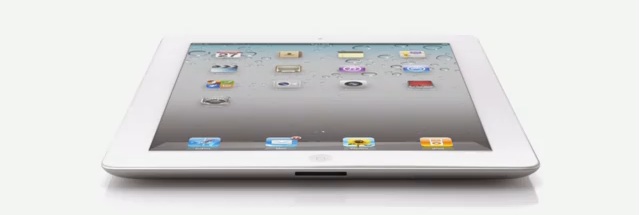
Canada Gets the iPad2 on March 25


We all knew it was inevitable, with the launch of various tablet devices over the past six months, there was no way that Apple was going to be left behind (despite being the innovator for the product).


Yesterday, Apple announced that the iPad2 will be coming to Canada on March 25, and promises to be yet another marvel from the electronics giant. Some of the new features include:


  • Two cameras (front and rear-facing) for FaceTime users
  • HD video recording
  • Dual core chip
  • 9.7inch high-resolution screen
  • Pre-loaded with iOS4
  • Updates to existing features, such as the accelerometer, gyro-scope and compass, now work smoothly together
  • Video-mirroring allows the iPad 2 to plug into your projector or HDTV for full-screen cinematic viewing and sharing
  • 33% thinner and almost 15% lighter than the original iPad
  • Maintains the same 10-hour battery life
And in order to keep your iPad2 looking brand new, Apple has also introduced the iPad Smart Cover, available in a range of colours to completely personalize the newest addition to your Apple collection.

As soon as this is available in Canada, Rogers will ensure that the existing iPad plans are available for users wishing to move to the new device. And the new Data Share Plans are expanding to include iPad2 as well.

Monday, February 21, 2011

Devices To Watch Out For In 2011

With CES 2011 having taken place recently, there is much talk about all the new devices coming to market this year. At this time it is hard to determine which carrier will be responsible for which device, but here are a few to keep your eyes open for as we move into 2011:


Motorola Atrix
This much-hyped device is set to directly compete with the iPhone, with its 4G connectivity and dual-core processor. 1GB RAM, 16GB of internal storage, a 5MP camera and a super wide screen, as well as the latest Android software make this a phone to watch out for. The only sad thing for us at Rogers....this is going to be exclusively available to Bell Canada customers.


Samsung Infuse 
Another Android submission as a follow-through from the current Samsung Galaxy S - it's hard to believe that a device could get even more impressive, but it appears that Samsung has done so! A single core processor and 512MB RAM seem at first glance to make this inferior to the existing Galaxy, but take note - 8MP camera and a 4.5" Super AMOLED screen. Not only is the camera comparable (if not better) to most standard digital cameras, but the high resolution, top quality screen will make your pictures crystal clear.


This device is listed as 4G so might not be around until Rogers has fully implemented its LTE network, but definitely one to watch out for. Telus is also likely to carry this model.


LG Optimus 2X
This device is a close competitor for the entire Samsung Galaxy line-up across all carriers, but with a smaller processor. On the plus side, the screen is high quality (800 x 480) and shoots 1080p video - now that beats most digital cameras to the punch. Finally, for those who want a face-to-face experience using applications like Skye, or Qik, there is a front facing camera standard on the device. This is set to be released on all Canadian carriers.


With thanks to The Cellular Guru for the review tips


BlackBerry Playbook
This is the highly anticipated BlackBerry response to the iPad. There are almost too many awesome features to describe, but here are just a few to wet your appetite - 3MP forward-facing camera, 5MP rear-facing camera, 1080p HD video recording, 7" LCD display, 1Ghz dual-core processor, and....get this....micro USB and HDMI ports - a first for any tablet device currently on the market. This will be carried by Rogers, but no word yet on whether the other Canadian carriers will have it also. Rumors have it that this will first be available in WiFi only, with the possibility of a 3G+ version later in the year. 

Thursday, November 4, 2010

Does Apple's iPad Face Some New Competition?

Originally posted October 1, 2010


C  Documents and Settings michelle Desktop Tablet


Samsung and BlackBerry recently announced their new tablet devices. Are these possible contenders to the Apple iPad?


Samsung Galaxy Tab
  • Launches at the end of November on Rogers Wireless
  • 7-inch screen
  • Runs Android 2.2
  • Cortex A8 1 GHz processor
  • 3-megapixel camera and a 1.3-megapixel front-facing camera for video chatting
  • Access to the Android Market (alternative to Apple's iTunes store)
  • Support for Adobe Flash 10.1
  • Wi-Fi
  • It also seems that Samsung is positioning the tablet as a voice device
There is still no word on pricing for the Samsung Galaxy Tab, but industry experts feel it would be wise for Samsung to position this device as a competitor to the iPad, and so ensure that pricing is placed lower.


BlackBerry Playbook


  • Full Adobe® Flash® 10.1 enabled
  • Built-in support for HTML 5  
  • 7" LCD display, 1024 x 600 screen resolution
  • 1GHz dual core processor; 1GB RAM
  • Built-in microUSB connector
  • Multi-touch capacitive screen
  • Wi-Fi
  • On-screen keyboard
  • True multi-tasking
  • 3MP hi-def forward-facing camera; 5MP hi-def rear-facing camera
  • 1080P HD video
  • Ability to pair with BlackBerry Smartphone


No word on the launch date for this device, but be sure to take a look on BlackBerry's website for a sneak video (http://na.blackberry.com/eng/).

Students Head Back To School with Smartphones

C  Documents and Settings michelle Desktop Back To School1
Originally posted September 23, 2010

This month has seen the return of students to their respective institutions, and what a month for wireless this has been!

With a huge influx of quick messaging and touch screen devices, such as the Samsung Corby Pro and the LG Neon 2, students have had their fair share of phones to choose from.

There has definitely been an increase in wireless activity among students, even from last year, as purchasing a new phone has become a staple of the "Back To School Shopping List".

And more students are moving away from the standard cellular device, embracing the Smartphone trend that offers a more feature-rich experience. Not only do these devices give students access to their email, but they can stay up to date with their friends on campus via the social networking sites that seem to be a standard on new devices.

Devices such as the Motorola Flip Out with MotoBlur, with swipe text technology for faster messaging, and the BlackBerry 9300 Curve, with 3G capabilities, have been extremely popular. Prices are now more affordable, and there have been some great Student Plan offers this year.

It has been an extremely busy time for us - some might say it has been like a second Christmas for the wireless industry!

The Newest Android From Sony Ericsson

Originally posted June 17, 2010
Key Features of the new Sony Xperia X10 - available now at Rogers:
  • The Xperia X10 phone provides a rich navigation experience with an easy-to-use, smart and visual interface
  • The Timescape and Mediascape applications let you view all your communication or media in one window
  • Access Google services easily or enrich your phone with applications from Android Market
  • The 4" responsive touch screen and ultra-fast processor also make navigating the phone a breeze and watching your favourite videos on it pure pleasure
  • Take pictures with an 8.1MP camera with face recognition software
  • Built in GPS provides location based services like Google Maps, to help you find your way to your destination. You can even add location information to your images with the geo-tagging function
  • Turbo 3G gives you broadband-like speed in your phone. Download large files and attachments super fast, and browse websites and news feeds in seconds
  • Fully synchronizes with your old phone, even if it isn't a Sony Ericsson. Transfer contacts, calendars, notes and bookmarks; and you can even manage up-to-date information in your mobile phone from the Internet
  • Suits any style with colour availability in black or white
Get a full product simulation on the Sony Ericsson website

Friday, October 29, 2010

BlackBerry Tips & Tricks


Originally posted June 16, 2010
Here are some helpful tips to making the most of your BlackBerry smartphone!


Messaging Tips
  • Create a custom icon for BlackBerry Messenger v5.0 contacts
  • Highlight the contact, press menu and show on home screen
  • Delete multiple emails
  • Highlight any email and hold down caps while scrolling up or down (then delete)
  • To move to the last cursor position after you close and reopen a received email message or PIN message, press G
  • In a message press the Shift key and the Space key to move up a screen. Press the Space key to move down a screen
  • View the email address of a sender
  • Highlight the sender name in an email and press Q
  • Don't want to receive SMS or MMS messages?
  • Go to Options>Security Options>Firewall. Check off SMS and MMS
  • To view received messages press Alt I. To view sent messages press Alt O. Hit the back button to view all messages again
Typing Tips
  • Type "B" to go to the bottom or "T" to go to the top of your Messages list, or Space to skip a page
  • Hold the ALT key and press the Right Shift key to lock caps when typing. Press the Right Shift key again to unlock
  • To insert a period, press the Space key twice. The next letter is capitalized.
  • To type accented/special characters, press and hold the letter key and slide your finger left or right on the track pad/trackball
  • To capitalize a letter, press and hold the letter key until the capitalized letter appears
  • To reply to all in an email message or a PIN message, press L.
  • Hold the ALT key and press the Left Shift key to lock numbers when typing. Press the Left Shift key again to unlock
  • To insert an at sign (@) or a period (.) in an email address field, press the Space key
Other Helpful Tips
  • Ever have to dial a 1-800 number with letters using your BlackBerry?
  • Hold ALT while typing the letters and dial
  • To zoom in before taking a picture, press the Volume Up key. To zoom out press the Volume Down key
  • Having trouble reading the text on your BlackBerry? Change the font!
  • Options >Screen>Keyboard>Font Family
  • When updating BlackBerry App World make sure to perform a reboot of your BlackBerry
  • While listening to music in the media player hit N for the next track or P for the previous track
With thanks to BlackBerry Help for the daily updates. Follow them on Twitter at http://twitter.com/BlackBerryHelp.

Top Three Smartphone Features Requested By Wireless Customers

Originally posted May 20, 2010

With more and more people taking on smartphones as part of their daily inventory, there have been some common elements when it comes to what they look for before purchasing. 29% of the US population in Q4 2009 owned a smartphone, and the number is set to increase as 2010 moves ever forwards - this makes it so important for providers, like Rogers, to understand what their users want.

The same survey found that the following items were a must have for new and continuing smartphone users:


    1. Email (demanded by 85% of users)
    2. Internet browser (demanded by 78%)
    3. Digital camera (demanded by 73%)

Although these three elements shouldn't be the basis of your sales pitch, they certainly help focus the pitch, and allow sales representatives to direct their questions to new, or existing, smartphone users accordingly.

Pretty much all smartphones have the above capabilities, so sales representatives need to focus on how the customer is going to use their phone the most, so that they can recommend the most suitable device out of the large number available.

In addition, as much as many people hate to admit it, text and email are becoming the more commonplace means of communication now, instead of simply picking up the phone and talking to someone. This is mainly due to the quick and instant nature of the message, versus a long winded telephone call when you are in a rush. Did you know that 91% of all phone owners were four times more likely to respond to a text message than voicemail??

With this trend in mind, and the fact that smartphones are meant to have lower voice call quality than standard cellular devices, sales reps should always ask how dependent customers are on voice services, as part of the "How are you going to / how do you use your smartphone?" All of these items, plus staying up to date on these kinds of statistics and trends, will help our sales teams position devices to customers so that they will not only get the best use out of the phone, but will continue to value their wireless services.

New Contender in the Wireless Industry Space

Originally posted May 14, 2010
Apple announces the launch of the iPad...
...and Rogers Wireless is set to be the official carrier for the product.

Information appears to be limited to us at the Rogers end because there has been no word yet on whether our dealer locations will hold the product itself, or if we are just expected to provide the data activations for the device.

So far, two data plans have been announced for the iPad, and many of us are expecting customers to purchase the device at the Apple Stores, and then come to a Rogers location to activate or add their data plan to existing accounts:
  • $15 for 250MB
  • $35 for 5GB
And as with the release of the original iPhone, there are always the complaints that Rogers isn't providing an unlimited data plan. If you ask me 5GB is a serious amount of data!

In the past, responses to the lack of an "unlimited" data plan prompted Rogers to offer a 6GB data plan - an extremely popular plan with data users Canada-wide. And although the complaints continued, statistics show that the average user of an iPhone only needed about 500MB of data a month! So what's all the fuss about?! Especially when there is Wi-Fi built in.

And who's to say that things won't change as the iPad becomes a more substantial product within the Rogers Wireless space? Rogers has never carried a product quite like the iPad, and only time will tell as to how customers will react to it, purchase it, use it etc.

Experience with the iPhone might help our dedicated sales representatives to anticipate questions, concerns, and expectations for the iPad.

The iPad comes in two main specifications - Wi-Fi alone, and Wi-Fi with 3G - and has three sizes - 16GB, 32GB and 64GB. Pricing is likely to be similar to the US where the Wi-Fi 16GB model starts at $499.99.

It will be interesting to see how this new product impacts the wireless and notebook markets - Rogers already has their Netbook products out in the market, and the way I see it...the iPad is likely to blow all of them out of the water.

Watch out - the iPad will be here soon!