Showing posts with label camera. Show all posts

Wednesday, November 9, 2011

Smartphones....in 3D?

Aside from all the new phones out there these days, there are new technologies showcasing all the time, and 3D technology is one of them. There are currently two devices available in the Rogers line up that feature this technology - the HTC Evo 3D and the LG Optimus 3D. The best part about it? You don't have to wear those goofy glasses to enjoy amazing 3D pictures and video!


But just how does the technology work? We all remember the 3D pictures we had as kids that were red and green fuzzy images until we put on the included cardboard specs, so how come we don't have to wear them now?


For all those tech enthusiasts out there, here is your answer. There are two technologies used to enable a glasses-free 3D experience - lenticular display and parallax barrier. Lenticular works best at distance and on larger displays (this was used on those old rules and stickers that, when tilted and moved, displayed motion). Conversely, parallax barrier is ideal up close, on smaller screens such as smartphones. Both technologies display different areas of an image to your left and your right eye. Your brain fills in the blanks and effectively tricks you into seeing three dimensions.


Another cool thing about these phones? Whether you take a picture or video in 3D or not, it never compromises the quality of the image when you send it to another user. If they have a 3D device, they will see it as you see it; if they have a regular smartphone, it will simply show as a high-quality image. This means that you aren't limited to enjoying the multi-media options if your friends and family don't have a device from the same family.


LG Optimus 3D
HTC Evo 3D


Why Choose a 3D Smartphone?


The HTC Evo and the LG Optimus feature the latest in Android platforms - Gingerbread 2.3 - which means that you can capture your best pictures and video, while surfing the net, and downloading the latest editing application. All at the same time.


You have the choice of switching between the 2D and 3D camera to suit your shooting needs, and you can also customize the interface with multiple 3D applications now available. This is all powered by a dual core processor, making sure you don't miss a moment of your 3D movies and games.


You also have "mixed mode" which allows you to complete standard tasks, such as emailing, browsing and calling, in 2D; and you can enjoy videos, games and pics in the 3D mode app.


Final moment of awesome-ness - if you own one of the new 3D TV's, you can connect via an HDMI cable and have your 3D images come jumping out of the big screen.


Both of these devices create a niche market - they not only address the needs of those customers who want the latest device with the smartest technology, but they provide an element that makes the phone entirely unique. A great excuse to get your phone out, play around with the 3D camera and show of your skills to your friends and family.


So if you are looking for the perfect gift this coming season, be sure to check out these two Android devices. We think you'll enjoy them!


Tuesday, August 2, 2011

Last Symbian Standing - The Nokia X7

This past week I had the opportunity to test out the new Nokia X7 and I wanted to let our readers know what to expect with the device.


Design
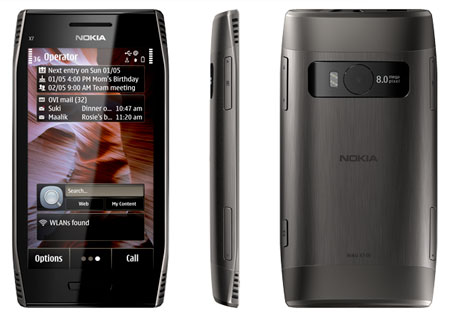
The Nokia X7 has a very futuristic look to it, with its metal backing and angular design. The device features four grilled "speakers" on the front face, but only two are actually functional. However, this doesn't take away from the epic sound quality when playing movies or music from the phone and keeps the look symmetrical. In addition, the metal backing and seamless buttons across the outside of the phone contribute to a sleek look, as well as the almost-hidden SIM card tray. Although this feature keeps the phone looking smooth, I did have a little trouble working out how the tray ejects from the phone and actually getting it out of the phone. 


The phone takes a regular micro-USB charging cable, one of which is included in the box, and also comes with the most comfortable headphones. If you are one of those people that suffers from ear-ache after five minutes of using the traditional headsets that come with most phones, you are in for a surprise. These fit snugly in your ear and provide amazing stereo-quality sound.


User Interface
This is the last Symbian device to come from Nokia, and it seems that finally, the operating system is exceptionally user friendly. In the past, Symbian was known for its ability to allow the user to switch between a home and work profile, which ended up being more confusing than convenient. This time, Symbian Anna puts everything the user needs on one of three home screens:

  • Icons are very easy to read and understand
  • Rearranging screen set up is very simple by utilizing the now popular "press and hold" motion, the user can move icons to positions on the main screen that suit their usability best
  • Quick links to social media feeds, calendar, applications, Youtube, messages etc, make it easy to find what you want, fast
  • This is a full touch-screen device, and the auto-rotate function has no hesitation which allows the user to quickly obtain a wider, landscape keyboard for faster typing and better viewing
  • The calendar function provides a great visual display from the third home screen, and allows the user to select and day and review appointments in an adjacent window
In fact, there have been many customers mistaken that this is an Android based operating system and device - definitely a familiar set up for many users.

Multi-media
Aside from the fact that the device comes pre-loaded with the Transformers 3 movie trailer, there are numerous other reasons to check out the multi-media on the Nokia X7. 
  • The 8MP camera is amazing for taking high quality pictures - this one was taken in full daylight with barely any zoom required. The clarity is amazing!
  • Shots can be captured with the smooth shutter button located on the back sloped side of the device, as well as on the screen itself. The shutter button can sometimes be hard to reach so the on-screen option is great
  • The video is 720p quality and captures all elements on film, reducing movement blur and ensuring the highest quality video (although I didn't get a chance to video anything over the long weekend, take a look at this sample video from Youtube featuring the X7's 720p camera)


The only bad thing about the cameras on this device is the fact that there is no front-facing camera, so no opportunity to use the full services for applications such as Qik or Skype. 


The four-inch Super AMOLED screen, first debuted on the likes of the Samsung Galaxy, makes every picture, wallpaper, video and main screen look crystal clear. 


Overall Thoughts
A great device all around. It was easy to use, easy to find most things, and I was blown away by the camera quality (better than my own digital camera). The device was pre-loaded with a bunch of fun apps, including Youtube and even National Geographic for some interesting reading opportunities. Social media feeds were easy to stay up to date with, and check on a regular basis. Email was also extremely easy to set up, if using Gmail or Hotmail (POP3 clients). I have to say, that I think I liked this most of all because it was so similar in looks to the Android platform.


The only (maybe) bad thing I have to say about this device, besides the fussy SIM card tray, was the fact that there aren't as many applications available to the Symbian system as there are for, say Apple or even BlackBerry. But, having said that, I don't use millions of applications anyways, so it's not really a selling point for me. The functionality of the device is what I look for most, and this device seemed to have it all. I was pleasantly surprised.


If you have had the chance to use the Nokia X7, or recently purchased one, we'd love to hear what you think. Feel free to leave your comments below.

Wednesday, July 27, 2011

What's new for Q3?

As always there are rumours, speculations and forum discussions about the latest devices to hit the shelves - so, here at Cellworks, we like to keep our customers well informed.
Check out the latest additions to the Smartphone category:


Nokia X7 - $29.99 (3 year voice & data plan)
Nokia X7

Target Market

  • Young, adult, tech enthusiasts looking for a smartphone with high quality multimedia and gaming features
  • First time smartphone users looking for an affordable device


Features & Benefits

  • 8MP camera with 720p HD video capture
  • Wifi connectivity
  • Integrated GPS with Free Ovi Maps
  • Symbian Anna –latest version of the Symbian operating system. Includes fully customizable homescreens, widgets and social networking feeds.
  • 8GB memory card included in box
Stay tuned for a product review on this device as we currently have a demo being tested.


$149.99 (with 3 year voice & data plan)
Samsung Galaxy Infuse 4G

Target Market
  • Tech enthusiasts and fans of the latest cool technology trend
  • Samsung/Android advocates looking for the newest smartphone


Features & Benefits
  • 4G 21Mbps downloads means shorter wait times when watching videos or downloading the latest apps and games
  • Powerful 1GHz processor for faster performance and multi-tasking
  • Stylish, lightweight design - only 8.99mm thin
  • 8MP camera with 1080p video capture
  • Share your content with an HDMI output and DLNA support
  • Built in WiFi and GPS
  • 16GB internal memory; expandable to 32GB
  • Android 2.3 Gingerbread


    HTC Evo 3D

    Target Market

    • 22 - 35 year old customers looking for the latest technology available
    • Mobile multimedia and gaming enthusiasts who demand high-end features like HD screens and dual-core processors


    Features & Benefits

    • 4.3” qHD touch screen with glasses free 3D display
    • Dual 5MP cameras for capturing stunning 2D or 3D photos
    • 1.2 GHz dual-core processor
    • HTC Sense user interface - offers nearly limitless possibilities for customizing your phone's home screen, widgets, and social networking feeds
    • WiFi calling for Android - make and receive voice calls over a WiFi connection
    • HDMI output - allows content to be transmitted to a 3D enable HDTV for big screen viewing
    • Android 2.3 Gingerbread
    • WiFi and GPS built in

    Thursday, November 4, 2010

    Does Apple's iPad Face Some New Competition?

    Originally posted October 1, 2010


    C  Documents and Settings michelle Desktop Tablet


    Samsung and BlackBerry recently announced their new tablet devices. Are these possible contenders to the Apple iPad?


    Samsung Galaxy Tab
    • Launches at the end of November on Rogers Wireless
    • 7-inch screen
    • Runs Android 2.2
    • Cortex A8 1 GHz processor
    • 3-megapixel camera and a 1.3-megapixel front-facing camera for video chatting
    • Access to the Android Market (alternative to Apple's iTunes store)
    • Support for Adobe Flash 10.1
    • Wi-Fi
    • It also seems that Samsung is positioning the tablet as a voice device
    There is still no word on pricing for the Samsung Galaxy Tab, but industry experts feel it would be wise for Samsung to position this device as a competitor to the iPad, and so ensure that pricing is placed lower.


    BlackBerry Playbook


    • Full Adobe® Flash® 10.1 enabled
    • Built-in support for HTML 5  
    • 7" LCD display, 1024 x 600 screen resolution
    • 1GHz dual core processor; 1GB RAM
    • Built-in microUSB connector
    • Multi-touch capacitive screen
    • Wi-Fi
    • On-screen keyboard
    • True multi-tasking
    • 3MP hi-def forward-facing camera; 5MP hi-def rear-facing camera
    • 1080P HD video
    • Ability to pair with BlackBerry Smartphone


    No word on the launch date for this device, but be sure to take a look on BlackBerry's website for a sneak video (http://na.blackberry.com/eng/).

    The Newest Android From Sony Ericsson

    Originally posted June 17, 2010
    Key Features of the new Sony Xperia X10 - available now at Rogers:
    • The Xperia X10 phone provides a rich navigation experience with an easy-to-use, smart and visual interface
    • The Timescape and Mediascape applications let you view all your communication or media in one window
    • Access Google services easily or enrich your phone with applications from Android Market
    • The 4" responsive touch screen and ultra-fast processor also make navigating the phone a breeze and watching your favourite videos on it pure pleasure
    • Take pictures with an 8.1MP camera with face recognition software
    • Built in GPS provides location based services like Google Maps, to help you find your way to your destination. You can even add location information to your images with the geo-tagging function
    • Turbo 3G gives you broadband-like speed in your phone. Download large files and attachments super fast, and browse websites and news feeds in seconds
    • Fully synchronizes with your old phone, even if it isn't a Sony Ericsson. Transfer contacts, calendars, notes and bookmarks; and you can even manage up-to-date information in your mobile phone from the Internet
    • Suits any style with colour availability in black or white
    Get a full product simulation on the Sony Ericsson website

    Friday, October 29, 2010

    BlackBerry Tips & Tricks


    Originally posted June 16, 2010
    Here are some helpful tips to making the most of your BlackBerry smartphone!


    Messaging Tips
    • Create a custom icon for BlackBerry Messenger v5.0 contacts
    • Highlight the contact, press menu and show on home screen
    • Delete multiple emails
    • Highlight any email and hold down caps while scrolling up or down (then delete)
    • To move to the last cursor position after you close and reopen a received email message or PIN message, press G
    • In a message press the Shift key and the Space key to move up a screen. Press the Space key to move down a screen
    • View the email address of a sender
    • Highlight the sender name in an email and press Q
    • Don't want to receive SMS or MMS messages?
    • Go to Options>Security Options>Firewall. Check off SMS and MMS
    • To view received messages press Alt I. To view sent messages press Alt O. Hit the back button to view all messages again
    Typing Tips
    • Type "B" to go to the bottom or "T" to go to the top of your Messages list, or Space to skip a page
    • Hold the ALT key and press the Right Shift key to lock caps when typing. Press the Right Shift key again to unlock
    • To insert a period, press the Space key twice. The next letter is capitalized.
    • To type accented/special characters, press and hold the letter key and slide your finger left or right on the track pad/trackball
    • To capitalize a letter, press and hold the letter key until the capitalized letter appears
    • To reply to all in an email message or a PIN message, press L.
    • Hold the ALT key and press the Left Shift key to lock numbers when typing. Press the Left Shift key again to unlock
    • To insert an at sign (@) or a period (.) in an email address field, press the Space key
    Other Helpful Tips
    • Ever have to dial a 1-800 number with letters using your BlackBerry?
    • Hold ALT while typing the letters and dial
    • To zoom in before taking a picture, press the Volume Up key. To zoom out press the Volume Down key
    • Having trouble reading the text on your BlackBerry? Change the font!
    • Options >Screen>Keyboard>Font Family
    • When updating BlackBerry App World make sure to perform a reboot of your BlackBerry
    • While listening to music in the media player hit N for the next track or P for the previous track
    With thanks to BlackBerry Help for the daily updates. Follow them on Twitter at http://twitter.com/BlackBerryHelp.

    Samsung Launches Its First Android Device for North America

    Originally posted March 11, 2010
    Android seems to be the talk of the town in recent days and weeks around the communications water cooler. The newest contender for the GSM market is the Samsung Galaxy Spica i5700 - although this is North America's first Samsung Android to come to market, it is the second seen in Europe and the fourth worldwide.

    Features:
    • Android 1.5 platform
    • 800MHz processor
    • Support for video files
    • Pre-installed "switcher" applications
    • Two colour variations - black/red and white/green
    • 3.2 inch screen with a resolution of 320 x 480 pixels, and supporting 16 million colours
    • 3.2MP camera with video capability
    User Feedback - Positive:
    • Fashionable and sleek
    • Slim and compact with minimal navigational buttons
    • Applications load smoothly one at a time
    • Platform is user friendly, especially for those who have previous experience with the Android OS
    • Device can run continuously for two days on HSPA (3G) connectivity
    • Moving through applications on the device is smooth and simple, with only a handful of front facing buttons to use
    User Feedback - Not-So-Positive:
    • Looks very similar to a previous model
    • Surface is prone to fingerprints and scratches
    • Only 200MB of internal storage
    • No flash on the 3.2MP camera
    • Having a hard time keeping up with the previous model in terms of speed, functionality, and in-built items, such as the camera and on-board storage
    • Have to hold the unlock button down for a long period of time to get the handset going
    • Device can become laggy when using multiple applications
    Overall Thoughts:
    An average device suitable for users that like some multi-media capabilities. If the user is not hard on the device, and wants something to keep them connected, then the Galaxy Spica is the Android device for them. However, for those power users who want something a little more impressive, critics are suggesting the "older brother" model, the i7500.