Showing posts with label iPad. Show all posts

Monday, October 17, 2011

What is iCloud?

iCloud is Apple’s new cloud service, which stores your music, photos, apps, calendars, documents, and more, and wirelessly pushes them to all devices. iCloud is integrated with your apps, so everything happens automatically. You get instant access to your music, apps, and latest photos, and iCloud keeps email, contacts, and calendars up to date across all of your devices.

iCloud is free with iOS 5 and OS X Lion. It comes with unlimited free storage for purchased music, TV shows, books, and apps. You also get 5GB of free storage for email, documents, and backup. If you need more, you can easily purchase a storage upgrade right from their device.

iTunes in the Cloud
With iTunes in the Cloud, any new music you buy is downloaded to all your iOS devices over Wi-Fi or 3G. You can even go back to songs, albums, or TV shows were purchased in the iTunes Store and download them again at no additional cost to your iPhone, iPad, iPod touch, Mac, or PC.

And if you have music you’ve ripped from CDs or purchased somewhere other than iTunes, you can get the same benefits of iTunes in the Cloud with iTunes Match. 

Photo Stream
If you have taken a photo on your iPhone and want to view it later on another device—only to realize you haven’t synced your photos—you will appreciate Photo Stream. When you take a photo on one device, it’s automatically sent to iCloud and pushed to your other devices. So you don’t have to sync photos to view them on another device or computer—the photos are just there.

Documents in the Cloud
If you are working on a document on your iPad and have the same app on another device, Cloud can keep your documents up to date across all devices. And all of this happens automatically, without any effort from you.

Apps and books
When you find an app you like on your iPhone, you may want to have the same app on your iPad. And if you purchase a book on your iPad, you may want it on your iPhone. iCloud makes sure all your iOS devices have the same apps and books.

Contacts, Calendar, and Mail
iCloud stores your contacts, calendars, and email and automatically pushes them to all devices. So you can switch from one device to another and still get email, stay in touch, and keep your calendar up to date.

Find My Friends
The Find My Friends app is a great way for you to share your location with people who are important to you. With Find My Friends, you can share your locations for a limited time and easily locate your friends and family from your iPhone, iPad or, iPod touch. Find My Friends is a free app available on the App Store. *

Find My iPhone
The Find My iPhone app can help you find a missing iPhone, iPad, iPod touch, and Mac. Just by opening the app and signing in with an Apple ID, you can see your device’s location on a map and have it display a message or play a sound, remotely lock the device, or wipe it to permanently delete all of your data.

Backup
Your carry important information on your iOS devices. If something happens to your device, Backup can help you get your information back. iCloud automatically backs up your iOS devices daily over Wi-Fi. And if you buy a new iOS device or need to restore information to one you already have, iCloud does all the work.

What does iCloud back up?
  • Purchased music, apps, and books
  • Photos and video in the Camera Roll
  • Device settings
  • App data
  • Home screen and app organization
  • Messages (iMessage, SMS, and MMS)
  • Ringtones
Getting an iCloud account - http://www.apple.com/icloud/

Transitioning MobileMe Customers
Customers with MobileMe may be wondering what iCloud means for their MobileMe account. 
  • http://www.apple.com/mobileme/transition.html
  • If you had a MobileMe account as of June 6, 2011, service has been extended through June 30, 2012
  • MobileMe members can move their me.com and mac.com email address, and their email messages, contacts, calendars, and bookmarks to iCloud.
  • After moving, customers can continue to use iWeb publishing, Gallery, and iDisk, through June 30, 2012. After that date, these services will no longer be available.
You will receive an email from Apple about how to move to iCloud.

Thursday, March 3, 2011

Canada Gets the iPad2 on March 25


We all knew it was inevitable, with the launch of various tablet devices over the past six months, there was no way that Apple was going to be left behind (despite being the innovator for the product).


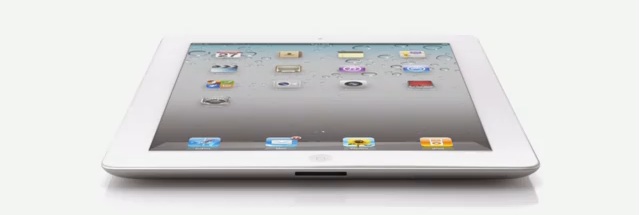
Yesterday, Apple announced that the iPad2 will be coming to Canada on March 25, and promises to be yet another marvel from the electronics giant. Some of the new features include:


  • Two cameras (front and rear-facing) for FaceTime users
  • HD video recording
  • Dual core chip
  • 9.7inch high-resolution screen
  • Pre-loaded with iOS4
  • Updates to existing features, such as the accelerometer, gyro-scope and compass, now work smoothly together
  • Video-mirroring allows the iPad 2 to plug into your projector or HDTV for full-screen cinematic viewing and sharing
  • 33% thinner and almost 15% lighter than the original iPad
  • Maintains the same 10-hour battery life
And in order to keep your iPad2 looking brand new, Apple has also introduced the iPad Smart Cover, available in a range of colours to completely personalize the newest addition to your Apple collection.

As soon as this is available in Canada, Rogers will ensure that the existing iPad plans are available for users wishing to move to the new device. And the new Data Share Plans are expanding to include iPad2 as well.

Friday, December 3, 2010

iPad Alternatives Are Becoming More Popular

With the launch of the Samsung Galaxy Tab, there is the expectation that more corporate users are going to demand it for their mobile internet needs. With the move away from paper and bulky laptops, tablets such as the Galaxy are likely to be popular with hospitals, doctors, and other business folk that have, until now, had to deal with endless paperwork.


The wait for the BlackBerry Playbook has also created an interest in these kinds of users, and functions such as HD capabilities, front and rear facing cameras, and the ability to tether with a BlackBerry device, such as the Torch, are tempting customers away from the ever-popular Apple iPad.


The Samsung Galaxy Tab is the first tablet device to allow full Flash performance, and with it's super high resolution AMOLED screen, the user experience is extremely impressive.


Until now, the Apple iPad has commanded tablet sales  with a 95% share of the market, but other manufacturers are jumping on the tablet bandwagon, with products set to emerge from Hewlett Packard, Motorola, Lenovo and Acer in the near future.


Companies that have so far focused their sales on standard PC's and laptops are looking to reduce their sales forecasts for these types of products in anticipation of cannibalization by the tablet market. Although the growth forecasts aren't changing dramatically, it is still evidence that customer preferences are moving to items that make their daily lives more efficient, and mean that they don't have to carry around such large devices to stay connected.


Most pricing is set to stay around the levels that Apple has set with its iPad, which suggests that customers are quite happy to pay between $299 and $699 for a new tablet.


This is definitely going to be an interesting market to watch over the Christmas season, and well into 2011. New competitors, new products - all very exciting!

Friday, October 29, 2010

New Contender in the Wireless Industry Space

Originally posted May 14, 2010
Apple announces the launch of the iPad...
...and Rogers Wireless is set to be the official carrier for the product.

Information appears to be limited to us at the Rogers end because there has been no word yet on whether our dealer locations will hold the product itself, or if we are just expected to provide the data activations for the device.

So far, two data plans have been announced for the iPad, and many of us are expecting customers to purchase the device at the Apple Stores, and then come to a Rogers location to activate or add their data plan to existing accounts:
  • $15 for 250MB
  • $35 for 5GB
And as with the release of the original iPhone, there are always the complaints that Rogers isn't providing an unlimited data plan. If you ask me 5GB is a serious amount of data!

In the past, responses to the lack of an "unlimited" data plan prompted Rogers to offer a 6GB data plan - an extremely popular plan with data users Canada-wide. And although the complaints continued, statistics show that the average user of an iPhone only needed about 500MB of data a month! So what's all the fuss about?! Especially when there is Wi-Fi built in.

And who's to say that things won't change as the iPad becomes a more substantial product within the Rogers Wireless space? Rogers has never carried a product quite like the iPad, and only time will tell as to how customers will react to it, purchase it, use it etc.

Experience with the iPhone might help our dedicated sales representatives to anticipate questions, concerns, and expectations for the iPad.

The iPad comes in two main specifications - Wi-Fi alone, and Wi-Fi with 3G - and has three sizes - 16GB, 32GB and 64GB. Pricing is likely to be similar to the US where the Wi-Fi 16GB model starts at $499.99.

It will be interesting to see how this new product impacts the wireless and notebook markets - Rogers already has their Netbook products out in the market, and the way I see it...the iPad is likely to blow all of them out of the water.

Watch out - the iPad will be here soon!